
在HTML5中使用localStorage存值取值以及存取JSON
我要在本地客户端使用localStorage存储配置的一些参数信息,然后在另外一个页面进行调取。
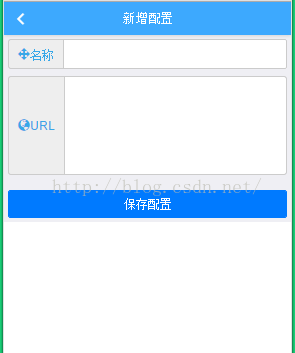
<script type="text/javascript">
layer.config({
skin: "layer-ext-seaning",
extend: "skin/seaning/style.css"
});
//清空localStorage的值
//window.localStorage.clear();
var jsonConfig = window.localStorage.getItem("localMsg");
jQuery(function () {
jQuery("#btnSaveInfo").click(function () {
var localUrl = jQuery("#txtLocalUrl").val();
var strRegex = /^(https|http|ftp|rtsp|mms)://[A-Za-z0-9]+.[A-Za-z0-9]+[/=?%-&_~`@[]":+!]*([^<>""])*$/;
if (jQuery("#txtSysName").val() == "") {
layer.msg("名称不能为空!", {
icon: 0,
time: 1000,
maxWidth: 200,
shade: 0.3
});
}
else if (jQuery("txtSysName").val() != "" && strRegex.test(localUrl)) {
if (jsonConfig == null) {
jsonConfig = [{ name: jQuery("#txtSysName").val(), localUrlAdd: jQuery("#txtLocalUrl").val()}];
jsonConfig = JSON.stringify(jsonConfig);
} else {
var str = { name: jQuery("#txtSysName").val(), localUrlAdd: jQuery("#txtLocalUrl").val() };
jsonConfig = eval(jsonConfig);
jsonConfig.push(str);
jsonConfig = JSON.stringify(jsonConfig);
}
window.localStorage.setItem("localMsg", jsonConfig);
layer.msg("配置成功!", {
icon: 6,
time: 1000,
maxWidth: 200,
shade: 0.3
});
resertForm();
}
else {
layer.msg("URL不符合要求!", {
icon: 0,
time: 1000,
maxWidth: 200,
shade: 0.3
});
}
});
});
function resertForm() {
jQuery("#txtSysName").val("").focus();
jQuery("#txtLocalUrl").val("");
}
</script>
</head>
<body>
<header class="mui-bar mui-bar-nav" style="font-size: 14px; background-color: #3DA9FE;">
<a href="LoadConfiguration.htm" class="mui-action-back mui-icon mui-icon-left-nav mui-pull-left" style="color: white;"></a>
<h1 class="mui-title" style="color: white;">新增配置</h1>
</header>
<div class="mui-content">
<div style="margin: 5px;">
<div class="input-group">
<span class="input-group-addon" style="color: #37A7E8;">
<span class="glyphicon glyphicon-move"></span>名称
</span>
<input id="txtSysName" type="text" class="form-control">
</div>
<div class="input-group" style="margin-top: 10px;">
<span class="input-group-addon" style="color: #37A7E8;">
<span class="glyphicon glyphicon-globe"></span>URL
</span>
<textarea id="txtLocalUrl" class="form-control" rows="5"></textarea>
</div>
</div>
<div style="padding: 5px; margin-top: 15px;">
<button id="btnSaveInfo" class="mui-btn mui-btn-primary" style="width: 100%;">保存配置</button>
</div>
</div>
</body>
</html>
以上就是添加配置信息页面,下面为获取配置列表页面:

<script type="text/javascript">
layer.config({
skin: "layer-ext-seaning",
extend: "skin/seaning/style.css"
});
var s = JSON.parse(window.localStorage.getItem("localMsg"));
var checkJsonConfig = JSON.parse(window.localStorage.getItem("checkLocalMsg"));
if (checkJsonConfig == null) {
defaultCustomService();
}
$(function () {
bindingConfig();
//点击选中项
$("input[name="radio1"]").click(function () {
var checkStr = null;
if (checkJsonConfig != null) {
checkStr = [{ checkName: $(this).attr("idName"), checkLocalUrlAdd: $(this).attr("idUrl")}];
checkJsonConfig = JSON.stringify(checkStr);
window.localStorage.setItem("checkLocalMsg", checkJsonConfig);
}
});
//点击删除
$("#btnDelete").click(function () {
var strName = $("input[name="radio1"]:checked ").attr("idName");
var strUrl = $("input[name="radio1"]:checked ").attr("idUrl");
if (strName == "客户服务") {
layer.msg("客户服务默认不能删除!", {
icon: 0,
time: 1000,
maxWidth: 200,
shade: 0.3
});
} else {
layer.msg("暂未增加删除功能!", {
icon: 0,
time: 1000,
maxWidth: 200,
shade: 0.3
});
}
});
});
//加载配置项
function bindingConfig() {
if (s != null) {
$("#divDefault").nextAll().remove();
$.each(s, function (i, item) {
$("#formGroup").append("<div class="mui-input-row mui-radio mui-left" style="margin: 10px 0px; padding: 3px 0px 3px 0px;">"+
"<label style="margin-top: -10px;">" + s[i].name + "<br/>" + s[i].localUrlAdd + "</label>" +
"<input idName="" + s[i].name + "" idUrl="" + s[i].localUrlAdd + "" name="radio1" class="radioName" type="radio" />" +
"</div>");
});
}
bindingCheckConfig();
}
//默认选中客户服务
function defaultCustomService() {
checkJsonConfig = [{ checkName: "客户服务", checkLocalUrlAdd: "http://www.zlsoft.com/mp/handle/LoginCheck.ashx"}];
checkJsonConfig = JSON.stringify(checkJsonConfig);
window.localStorage.setItem("checkLocalMsg", checkJsonConfig);
}
//绑定选中项
function bindingCheckConfig() {
//alert(checkJsonConfig[0].checkName);
$("input[idName="" + checkJsonConfig[0].checkName + ""]").attr("checked", "checked");
//$("input[idName="" + checkJsonConfig[0].checkName + ""]").attr("checked","checked").siblings().removeAttr("checked");;
}
</script>
</head>
<body>
<header class="mui-bar mui-bar-nav" style="font-size: 14px; background-color: #3DA9FE;">
<a href="AppLogin.htm" class=" mui-icon mui-icon-left-nav mui-pull-left" style="color: white;"></a>
<h1 class="mui-title" style="color: white;">服务列表</h1>
<a href="AddConfiguration.htm" class="mui-btn mui-btn-link mui-pull-right" style="color: white;">新增</a>
</header>
<div class="mui-content">
<div class="mui-card" style="margin: 1px;">
<form id="formGroup" class="mui-input-group">
<div id="divDefault" class="mui-input-row mui-radio mui-left" style="margin: 10px 0px; padding: 3px 0px 3px 0px;">
<label style="margin-top: -10px;">
客户服务<br/>http://www.zlsoft.com/mp/handle/LoginCheck.ashx
</label>
<input idName="客户服务" idUrl="http://www.zlsoft.com/mp/handle/LoginCheck.ashx" name="radio1" class="radioName" type="radio"
checked="checked"/>
</div>
</form>
</div>
<div style="padding: 10px 10px;">
<input id="btnDelete" type="button" class="btn" value="删除" style="width: 100%; margin: 20px 5px 20px 0px; background-color: #3DA9FE; color: White;"/>
</div>
</div>
</body>
</html>
这里还有一个示例:
http://blog.csdn.net/smartsmile2012/article/details/45534253
