
Python通过websocket与js客户端通信示例
这里,介绍如何使用 Python 与前端 js 进行通信。
websocket 使用 HTTP 协议完成握手之后,不通过 HTTP 直接进行 websocket 通信。
于是,使用 websocket 大致两个步骤:使用 HTTP 握手,通信。
js 处理 websocket 要使用 ws 模块; Python 处理则使用 socket 模块建立 TCP 连接即可,比一般的 socket ,只多一个握手以及数据处理的步骤。
握手
过程
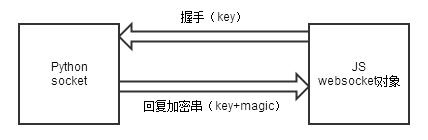
包格式
js 客户端先向服务器端 python 发送握手包,格式如下:
?| 1 2 3 4 5 6 7 8 |
GET
 /chat HTTP/1.1
Host:
 server.example.com
Upgrade:
 websocket
Connection:
 Upgrade
Sec-WebSocket-Key:
 dGhlIHNhbXBsZSBub25jZQ==
Origin:http://example.com
Sec-WebSocket-Protocol:
 chat, superchat
Sec-WebSocket-Version:
 13
|
服务器回应包格式:
?| 1 2 3 4 5 |
HTTP/1.1
 101 Switching Protocols
Upgrade:
 websocket
Connection:
 Upgrade
Sec-WebSocket-Accept:
 s3pPLMBiTxaQ9kYGzzhZRbK+xOo=
Sec-WebSocket-Protocol:
 chat
|
其中, Sec-WebSocket-Key 是随机的,服务器用这些数据构造一个 SHA-1 信息摘要。
方法为: key+migic , SHA-1 加密, base-64 加密,如下:
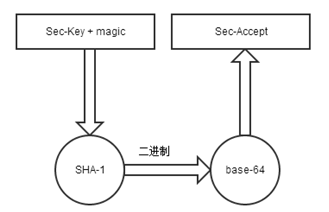
Python 中的处理代码
?| 1 2 |
MAGIC_STRING="258EAFA5-E914-47DA-95CA-C5AB0DC85B11"
res_key=base64.b64encode(hashlib.sha1(sec_key
+MAGIC_STRING).digest())
|
握手完整代码
js 端
js 中有处理 websocket 的类,初始化后自动发送握手包,如下:
var socket = new WebSocket("ws://localhost:3368");
Python 端
Python 用 socket 接受得到握手字符串,处理后发送
?| 1 2 3 4 5 6 7 8 9 10 11 12 13 14 15 16 17 18 19 20 21 22 23 24 25 26 27 28 29 30 31 32 33 34 35 36 |
HOST="localhost"
PORT=3368
MAGIC_STRING="258EAFA5-E914-47DA-95CA-C5AB0DC85B11"
HANDSHAKE_STRING="HTTP/1.1
101 Switching Protocols
"
"Upgrade:websocket
"
"Connection:
Upgrade
"
"Sec-WebSocket-Accept:
 {1}
"
"WebSocket-Location:ws://{2}/chat
"
"WebSocket-Protocol:chat

"
defhandshake(con):
#con为用socket,accept()得到的socket
#这里省略监听,accept的代码,具体可见blog:http://blog.csdn.net/ice110956/article/details/29830627
headers={}
shake=con.recv(1024)
ifnot
len(shake):
returnFalse
header,
data =shake.split("
",1)
forline
|
