
eclipse使用相对路径加载图片
在命令行下,我们可以直接用ImageIcon i = new ImageIcon( "xiaoai.jpg");直接加载当前目录下的图片,在eclipse中却不行,因为eclipse的源文件路径src和编译路径bin不是同一个,如果在eclipse写这句,它会在项目路径也就是src的上一级目录找这个文件,会出现找不到的异常。
使用方法:
String path = this.getClass().getClassLoader().getResource(".").getPath();
或者
String path = 类名.class.getClassLoader().getResource(".").getPath();
前者不能写在静态代码块中,后者可以
看一个例子,项目结构如图,图片直接放src目录下
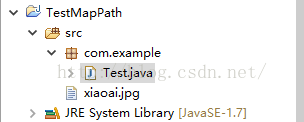
java代码
package com.example;
import java.awt.FlowLayout;

import javax.swing.ImageIcon;
import javax.swing.JFrame;
import javax.swing.JLabel;
import javax.swing.JPanel;

public class Test extends JFrame {

	/**
	 *
	 */
	private static final long serialVersionUID = 1L;

	public Test(String str) {
		super(str);
		JPanel p = new JPanel();
		// 获得类加载器路径
		String path = this.getClass().getClassLoader().getResource(".").getPath();
		System.out.println(path);
		// 后面的xiaoai.jpg直接粘贴到eclipse的src目录下或者netbeans的源包目录下
		ImageIcon i = new ImageIcon(path + "xiaoai.jpg");

		JLabel l = new JLabel(i);
		l.setBounds(0, 0, 800, 600);
		getLayeredPane().add(l, new Integer(Integer.MIN_VALUE));
		p = (JPanel) this.getContentPane();
		p.setOpaque(false);
		p.setLayout(new FlowLayout(FlowLayout.CENTER, 110, 30));
	}

	public static void main(String[] args) {
		Test dl = new Test("Test");
		dl.setDefaultCloseOperation(JFrame.EXIT_ON_CLOSE);
		dl.setLocation(400, 200);
		dl.setSize(800, 600);
		dl.setVisible(true);
	}

}
不过这种方法有缺陷,代码可以在IDE中运行,打包成jar之后不能访问图片,所以可以考虑把获取类加载器的上一级路径,然后把图片存到jar的外部
项目结构不变,java代码改成如下形式
package com.example;

import java.awt.FlowLayout;
import java.awt.image.BufferedImage;
import java.io.IOException;
import java.io.InputStream;

import javax.imageio.ImageIO;
import javax.swing.ImageIcon;
import javax.swing.JFrame;
import javax.swing.JLabel;
import javax.swing.JPanel;

public class Test extends JFrame {

	/**
	 *
	 */
	private static final long serialVersionUID = 1L;

	public Test(String str) {
		super(str);
		JPanel p = new JPanel();

		//ImageIcon i = new ImageIcon(ImageIO.read(this.getClass().getResourceAsStream("/xiaoai.jpg")));
		ImageIcon i = new ImageIcon(this.getImage("/xiaoai.jpg"));
		JLabel l = new JLabel(i);
		l.setBounds(0, 0, 800, 600);
		getLayeredPane().add(l, new Integer(Integer.MIN_VALUE));
		p = (JPanel) this.getContentPane();
		p.setOpaque(false);
		p.setLayout(new FlowLayout(FlowLayout.CENTER, 110, 30));
	}

	public BufferedImage getImage(String str) {
		BufferedImage image = null;
		try {
			InputStream is = this.getClass().getResourceAsStream(str);
			image = ImageIO.read(is);
		} catch (IOException e) {
			e.printStackTrace();
		}
		return image;
	}

	public static void main(String[] args) {
		Test dl = new Test("Test");
		dl.setDefaultCloseOperation(JFrame.EXIT_ON_CLOSE);
		dl.setLocation(400, 200);
		dl.setSize(800, 600);
		dl.setVisible(true);
	}

}注意这个路径里面比第一种方法多了一个斜线/这个代码既可以在IDE中执行,也可以打包成jar执行
建议将游戏存档文件存储到外部目录,不要存到jar的打包目录,jar一般情况只做只读的文件
声明:该文观点仅代表作者本人,牛骨文系教育信息发布平台,牛骨文仅提供信息存储空间服务。
- 上一篇: ImageIcon显示不出来.
- 下一篇: Java中ImageIcon的使用
