
python爬取公众号文章
跟着网上一教学视频编写爬取公众号文章,代码结构如下:login.py是登录模块,cookies.txt是登录获取到的cookie信息,cookie.py是解析cookie文件,登录公众号并查询公众号文章进行解析
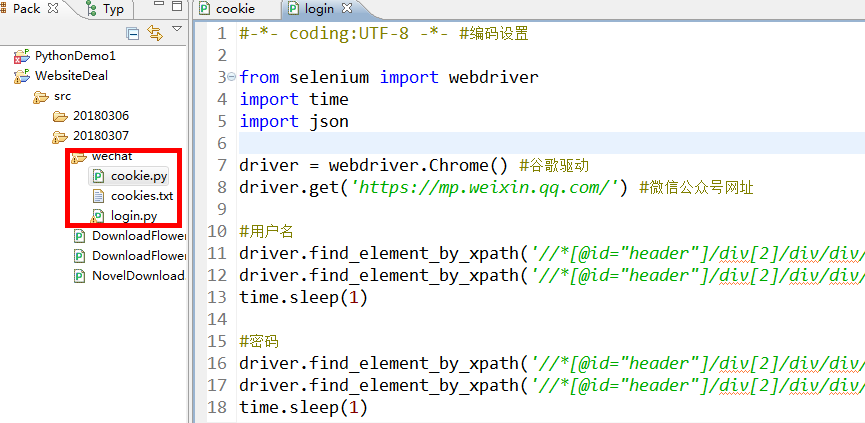
一、模拟登陆获取cookie,登陆过程中需要用手机扫描二维码
#-*- coding:UTF-8 -*- #编码设置

from selenium import webdriver
import time
import json

driver = webdriver.Chrome() #谷歌驱动
driver.get("https://mp.weixin.qq.com/") #微信公众号网址

#用户名
driver.find_element_by_xpath("//*[@id="header"]/div[2]/div/div/form/div[1]/div[1]/div/span/input").clear()
driver.find_element_by_xpath("//*[@id="header"]/div[2]/div/div/form/div[1]/div[1]/div/span/input").send_keys("969673395@qq.com")
time.sleep(1)

#密码
driver.find_element_by_xpath("//*[@id="header"]/div[2]/div/div/form/div[1]/div[2]/div/span/input").clear()
driver.find_element_by_xpath("//*[@id="header"]/div[2]/div/div/form/div[1]/div[2]/div/span/input").send_keys("123456")
time.sleep(1)

#记住密码
driver.find_element_by_xpath("//*[@id="header"]/div[2]/div/div/form/div[3]/label").click()
time.sleep(1)
#登录
driver.find_element_by_xpath("//*[@id="header"]/div[2]/div/div/form/div[4]/a").click()
time.sleep(15)

#获取cookie
cookies = driver.get_cookies()
print cookies

cookie = {}
for items in cookies:
    cookie[items.get("name")] = items.get("value")

with open("cookies.txt","w") as file:
    file.write(json.dumps(cookie))

driver.close()
二、读取cookie信息,自动登录并查旬公众号文章
#-*- coding:UTF-8 -*- #编码设置
import requests
import json
import re
import random
import time

#打开cookie文件
with open("cookies.txt","r") as file1:
    cookie = file1.read()
#将cookie转成json格式
cookies = json.loads(cookie)

#微信公众号网址,根据cookie登录系统,获取返回的信息,获取token
url = "https://mp.weixin.qq.com/"
response = requests.get(url,cookies = cookies)
token = re.findall(r"token=(d+)",str(response.url))[0] #获取返回的url token

print token

#查询条件
query = "python"
#查询链接
search_url = "https://mp.weixin.qq.com/cgi-bin/operate_appmsg?sub=check_appmsg_copyright_stat"
#http header
headers = {
    "User-Agent":"Mozilla/5.0 (Windows NT 6.1; WOW64) AppleWebKit/537.36 (KHTML, like Gecko) Chrome/63.0.3239.132 Safari/537.36",
    "Referer":"https://mp.weixin.qq.com/cgi-bin/appmsg?t=media/appmsg_edit_v2&action=edit&isNew=1&type=10&share=1&token=327625735&lang=zh_CN",
    "Host":"mp.weixin.qq.com",
}
#请求的数据
data = {
        "token":token, #token
        "lang":"zh_CN", #中文
        "f":"json", #格式
        "ajax":1, #异步
        "random":random.random(), #随机数
        "url":query,#查询条件
        "begin":"0",
        "count":"3",#每页多少条
    }
search_response = requests.post(search_url,cookies = cookies,data = data,headers = headers)

#print search_response.text

#总条数
max_num = search_response.json().get("total")
#计算总页数
num = int(int(max_num/3))
begin = 0
while num +1>0:
    data = {
        "token":token,
        "lang":"zh_CN",
        "f":"json",
        "ajax":1,
        "random":random.random(),
        "url":query,
        "begin":"{}".format(str(begin)),
        "count":"3",
    }

    search_response = requests.post(search_url,cookies = cookies,data = data,headers = headers)

    #print search_response.text
    #获取查询结果list
    content = search_response.json().get("list")
    #遍历获取title
    try:
        if content:
            for items in content:
                print items.get("title")
                print items.get("url")

            num -=1
            begin = int(begin)
            begin += 3
            time.sleep(1)
    except:
        print "error"
三、查询结果
1267686864
Intermediate Python(中级PYTHON)
http://mp.weixin.qq.com/s?__biz=MzA4MTA5MjE5Mw==&mid=400572886&idx=1&sn=d3c9c4d37351bc4ee8a8758c0d70c13a#rd
【Python编程】Python Style Guide
http://mp.weixin.qq.com/s?__biz=MzI2NzUxMDg2NQ==&mid=2247483873&idx=1&sn=2314305172636f4817f17c4be09aaf30&chksm=eafcf4dfdd8b7dc918d7bfa12586425c697ecf4500315d01c8c42d0d68da1817c002bb974b28#rd
用 Python 实现 Python 解释器
http://mp.weixin.qq.com/s?__biz=MjM5NjQ4MjYwMQ==&mid=2664608140&idx=2&sn=ab178acde33b8007ab448fdfaa7895e9#rd
Python进阶:Python魔法方法
http://mp.weixin.qq.com/s?__biz=MzIzMDQyMjcxOA==&mid=2247484471&idx=1&sn=c8dac6b9f475c84462609b0ebddfd41b&chksm=e8b2e5e6dfc56cf0af063df06d61c7917f685369497fae47b7d9a4aa64ac1da0e2505e94867a#rd
【Python编程】Python轻量级数据库SQLite
http://mp.weixin.qq.com/s?__biz=MzI2NzUxMDg2NQ==&mid=2247484161&idx=1&sn=4a63700c7c418a912a954b86c4649019&chksm=eafcf63fdd8b7f296deea71b8db87fa25258f12bc6b166ef43664df2aef4f03146cc28168a48#rd
Python For Data Analysis|Python书籍
http://mp.weixin.qq.com/s?__biz=MzA4OTg5NzY3NA==&mid=2649344821&idx=1&sn=c194b5190a52775348e082220f6231a1#rd
Python入门教程脱水版 | 2. Python风格
http://mp.weixin.qq.com/s?__biz=MzIzMzI0NjkwMw==&mid=2652210070&idx=1&sn=09eb2d16f90c16391e94788a6429100a&chksm=f369ba4ec41e3358f24b76ce492ae0045df4dc918675b56d16802574bd5bf35739f43557ee39#rd
用 Python 实现 Python 解释器(上)
http://mp.weixin.qq.com/s?__biz=MjM5NjQ4MjYwMQ==&mid=2664608140&idx=1&sn=f915e7ac0d9f2bc1eedf37f86dd722ea#rd
继续浅谈Python Python web开发
http://mp.weixin.qq.com/s?__biz=MzI5NzYwNjE3Ng==&mid=2247483915&idx=1&sn=bd4a62384236f55bf8e59017fe1704e2&chksm=ecb3cf44dbc44652882e8b27321642a6dd805a928e4a88d60f54eecc349058a8800b0c13ad92#rd
Python pip
http://mp.weixin.qq.com/s?__biz=MzI4MzIzNTUxMw==&mid=2247483836&idx=1&sn=5bb143dca38dda8daec4230ad6486ae5&chksm=eb8c846adcfb0d7ce33f65aa7461efc6b250be96202336ffbacc640c5ebd2790239adc5183d0#rd
Python讲义
http://mp.weixin.qq.com/s?__biz=MzI2MTQ2NDM5Nw==&mid=2247484246&idx=1&sn=6e5f340dd5618c13c0ca731f2cd12625&chksm=ea5b4b74dd2cc26225f81729ea62f86a38407e72ea84d76df5db9a58d9ffb325ff81d764e0fb#rd
Python 之旅
http://mp.weixin.qq.com/s?__biz=MzA3NDk1NjI0OQ==&mid=2247483882&idx=1&sn=33a42d9b74fc2d4df2dba86faa6b7d7d&chksm=9f76ad5ca801244a59585c3c53b43baceeab3dc04157113e4d0e244cadb6cb653e2ed836086f#rd
声明:该文观点仅代表作者本人,牛骨文系教育信息发布平台,牛骨文仅提供信息存储空间服务。
- 上一篇: 博客导出工具
- 下一篇: Android——用户登陆及用户名和密码的保存
