
Zend Framework2.3.3入门简单实例-登录功能
今天来实现一个简单的用户登录功能,效果如下图。
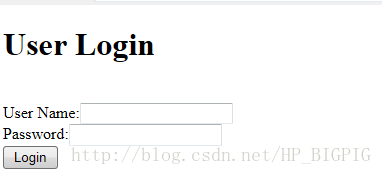
现在就来介绍大概的开发过程。
一、新建一个数据库wenotebook
Wenotebook数据库有一个数据表account,结构如下:
Zend Framework 没有提供 ZendModel 组件,所以我们先新建一个moduleApplicationsrc Application Model文件夹。
1、新建Account.php文件
三、配置数据库信息和ServiceManager
1、配置config/autoload/global.php文件
把
2)、"username" => "root","password" => "123456",这配置用户名和密码的信息也可以放到config/autoload/local.php文件。
Zend框架的modulemanager会合并每个模块的module.config.php文件,然后配置在config/autoload目录的*.global.php和*.local.php文件。所以把用户名和密码信息配置在config/autoload/local.php文件中也是可以的。
3)、service_manager是配置ServiceManager如何获得一个ZendDbAdapterAdapter对象的。
要完成这个过程需要使用一个工厂(ZendDbAdapterAdapterServiceFactory)。
2、使用ServiceManager来配置TableGateway和注入AccountTable
打开moduleApplicationModule.php文件,实现getServiceConfig()方法
至此,配置数据库的工作已完成。
四、定义表单AccountLoginForm
要实现一个登录功能,Form表单是必不是可少的。Zend Framework用ZendForm组件来管理控制Form表单。由于Zend Framework 也没有提供 ZendForm 组件,所以我们先新建一个moduleApplicationsrc Application Form文件夹。
定义一个Form需要继承ZendFormForm,AccountLoginForm如下:
1、IndexController
1)、添加protected $accountTable;属性;
2)、Action方法
现在就来介绍大概的开发过程。
一、新建一个数据库wenotebook
Wenotebook数据库有一个数据表account,结构如下:
CREATE TABLE account (id int(11) NOT NULL PRIMARY KEY auto_increment, name varchar(20) NOT NULL,pwd varchar(12) NOT NULL);二、新建model文件
Zend Framework 没有提供 ZendModel 组件,所以我们先新建一个moduleApplicationsrc Application Model文件夹。
1、新建Account.php文件
use ZendInputFilterInputFilter;
use ZendInputFilterInputFilterAwareInterface;
use ZendInputFilterInputFilterInterface;

class Account {
	public $id;
	public $name;
	public $pwd;
	protected $inputFilter; // <-- Add this variable

	public function exchangeArray($data)
	{
		$this->id = (!empty($data["id"])) ? $data["id"] : null;
		$this->name = (!empty($data["name"])) ? $data["name"] : null;
		$this->pwd = (!empty($data["pwd"])) ? $data["pwd"] : null;
	}

	// Add content to these methods:
	public function setInputFilter(InputFilterInterface $inputFilter)
	{
		throw new Exception("Not used");
	}

	public function getInputFilter()
	{
		if (!$this->inputFilter) {
			$inputFilter = new InputFilter();
			$inputFilter->add(array(
				"name" => "id",
				"required" => true,
				"filters" => array(
					array("name" => "Int"),
				),
			));
			$inputFilter->add(array(
				"name" => "name",
				"required" => true,
				"filters" => array(
					array("name" => "StripTags"),
					array("name" => "StringTrim"),
				),
				"validators" => array(
					array(
						"name" => "StringLength",
						"options" => array(
							"encoding" => "UTF-8",
							"min" => 1,
							"max" => 30,
						),
					),
				),
			));

			$inputFilter->add(array(
				"name" => "pwd",
				"required" => true,
				"filters" => array(
					array("name" => "StripTags"),
					array("name" => "StringTrim"),
				),
				"validators" => array(
					array(
						"name" => "StringLength",
						"options" => array(
							"encoding" => "UTF-8",
							"min" => 1,
							"max" => 6,
						),
					),
				),
			));

			$this->inputFilter = $inputFilter;
		}

		return $this->inputFilter;
	}
}
该类主要用对应数据表以及定义表单输入数据的规则。
2、新建AccountTable.php文件
use ZendDbTableGatewayTableGateway;

class AccountTable {
	protected $tableGateway;

	public function __construct(TableGateway $tableGateway)
	{
		$this->tableGateway = $tableGateway;
	}

	public function fetchAll()
	{
		$resultSet = $this->tableGateway->select();
		return $resultSet;
	}

	public function getAccount($id)
	{
		$id = (int) $id;
		$rowset = $this->tableGateway->select(array("id" => $id));
		$row = $rowset->current();
		if (!$row) {
			throw new Exception("Could not find row $id");
		}
		return $row;
	}

	public function saveAccount(Account $account)
	{
		$data = array(
			"name" => $account->name,
			"pwd" => $account->pwd,
		);

		$id = (int) $account->id;
		if ($id == 0) {
			$this->tableGateway->insert($data);
		} else {
			if ($this->getAccount($id)) {
				$this->tableGateway->update($data, array("id" => $id));
			} else {
				throw new Exception("Account id does not exist");
			}
		}
	}

	public function deleteAccount($id)
	{
		$this->tableGateway->delete(array("id" => (int) $id));
	}
}该类主要用于操作数据库。三、配置数据库信息和ServiceManager
1、配置config/autoload/global.php文件
把
return array(
    // ...
);改写return array( "db" => array( "driver" => "Pdo", "dsn" => "mysql:dbname=wenotebook;host=localhost", "username" => "root", "password" => "123456", "driver_options" => array( PDO::MYSQL_ATTR_INIT_COMMAND => "SET NAMES "GB2312"" ), ), "service_manager" => array( "factories" => array( "ZendDbAdapterAdapter" => "ZendDbAdapterAdapterServiceFactory", ), ), );1)、"dsn" => "mysql:dbname=wenotebook;host=localhost",这里的wenotebook是数据库名称。
2)、"username" => "root","password" => "123456",这配置用户名和密码的信息也可以放到config/autoload/local.php文件。
Zend框架的modulemanager会合并每个模块的module.config.php文件,然后配置在config/autoload目录的*.global.php和*.local.php文件。所以把用户名和密码信息配置在config/autoload/local.php文件中也是可以的。
3)、service_manager是配置ServiceManager如何获得一个ZendDbAdapterAdapter对象的。
要完成这个过程需要使用一个工厂(ZendDbAdapterAdapterServiceFactory)。
2、使用ServiceManager来配置TableGateway和注入AccountTable
打开moduleApplicationModule.php文件,实现getServiceConfig()方法
public function getServiceConfig()
{
	return array(
		"factories" => array(

			"AccountTableGateway" => function ($sm) {
			$dbAdapter = $sm->get("ZendDbAdapterAdapter");
			$resultSetPrototype = new ResultSet();
			$resultSetPrototype->setArrayObjectPrototype(new Account());
			return new TableGateway("tb_user", $dbAdapter, null, $resultSetPrototype);
			},
			"AlbumModelAccount" => function($sm) {
			$tableGateway = $sm->get("AccountTableGateway");
			$table = new AccountTable($tableGateway);
			return $table;
			},
		),
	);
}
至此,配置数据库的工作已完成。
四、定义表单AccountLoginForm
要实现一个登录功能,Form表单是必不是可少的。Zend Framework用ZendForm组件来管理控制Form表单。由于Zend Framework 也没有提供 ZendForm 组件,所以我们先新建一个moduleApplicationsrc Application Form文件夹。
定义一个Form需要继承ZendFormForm,AccountLoginForm如下:
use ZendFormForm;

class AccountLoginForm extends Form {
	public function __construct() {
		parent::__construct();

		$this->add(array(
			"name" => "id",
			"type" => "Hidden",
		));
		$this->add(array(
			"name" => "name",
			"type" => "Text",
			"options" => array(
				"label" => "User Name:",
				"id" => "name",
			),
		));
		$this->add(array(
			"name" => "pwd",
			"type" => "Text",
			"options" => array(
				"label" => "Password:",
				"id" => "pwd"
			),
		));
		$this->add(array("name" => "submit",
			"type" => "Submit",
			"attributes" => array(
				"value" => "Go",
				"id" => "submitbutton",
			),
		));
	}
}五、配置路由在Zend Framework中,要让View能实现正常访问还要配置路由。打开moduleApplicationconfigmodule.config.php文件,在routes节添加如下代码:
"login" => array(
	"type" => "ZendMvcRouterHttpLiteral",
	"options" => array(
		"route"    => "/account/login",
		"defaults" => array(
			"controller" => "ApplicationControllerIndex",
			"action"     => "accountlogin",
		),
	),
),
注意:这里的action名称建议用小写,否则容易出错。
1、IndexController
1)、添加protected $accountTable;属性;
2)、Action方法
public function AccountLoginAction()
{
	$form = new AccountLoginForm();
	$form->get("submit")->setValue("Login");

	$request = $this->getRequest();
	if($request->isPost()) {
		$account = new Account();
		$form->setInputFilter($account->getInputFilter());
		$form->setData($request->getPost());

		if ($form->isValid()) {
			$account->exchangeArray($form->getData());
			//$this->getAccountTable()->saveAccount($account);

			// Redirect to list of albums
			return $this->redirect()->toRoute("home");
		}
	}
	return array("form" => $form);
}
2、新建AccountLogin.phtml文件<?php
$title = "User Login";
$this->headTitle($title);
?>
<h1>
<?php echo $this->escapeHtml($title); ?>
</h1>
<?php
$form->setAttribute("action", $this->url("login", array("action" => "add")));
$form->prepare();
echo $this->form()->openTag($form);
echo $this->formHidden($form->get("id"))."<br />";
echo $this->formRow($form->get("name"))."<br />";
echo $this->formRow($form->get("pwd"))."<br />";
echo $this->formSubmit($form->get("submit"))."<br />";
echo $this->form()->closeTag();至此,整个登录功能就完成了。效果图下。原文地址:http://www.wenotebook.com/Article/Index?articleID=2014122105655
声明:该文观点仅代表作者本人,牛骨文系教育信息发布平台,牛骨文仅提供信息存储空间服务。
- 上一篇: 从零开始了解thinkphp框架,tp框架基础教程
- 下一篇: 开源是一种产业
