
3 Yii2.0灵活使用AppAssets管理CSS样式及JS脚本
(注:以下为Yii2.0高级应用测试)
Yii2.0对于CSS/JS 管理,使用AssetBundle资源包类。
视图如何按需加载CSS/JS ?
资源包定义:
backend/assets/AppAsset.php
<?php
namespace backendassets;

use yiiwebAssetBundle;

/**
 * @author chan <maclechan@qq.com>
 * @since 2.0
 */
class AppAsset extends AssetBundle
{
    public $basePath = "@webroot";
    public $baseUrl = "@web";
    //全局CSS
    public $css = [
        "css/animate.css",
        "css/style.min.css",
    ];
//全局JS
public $js = [
"js/jquery-2.1.1.js"
]; //依赖关系
public $depends = [
"yiiwebYiiAsset",
"yiiootstrapBootstrapAsset",
];
//定义按需加载JS方法,注意加载顺序在最后
public static function addScript($view, $jsfile) {
$view->registerJsFile($jsfile, [AppAsset::className(), "depends" => "apiassetsAppAsset"]);
}
//定义按需加载css方法,注意加载顺序在最后
public static function addCss($view, $cssfile) {
$view->registerCssFile($cssfile, [AppAsset::className(), "depends" => "apiassetsAppAsset"]);
}
}视图中如何使用:
<?php
use yiihelpersHtml;
use backendassetsAppAsset;
use backendwidgetsAlert;

/* @var $this yiiwebView */
/* @var $content string */

AppAsset::register($this);
查看源文件,看清CSS和JS的加载顺序
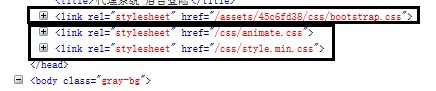
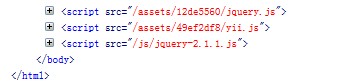
可以看出以此顺序为:依赖关系 -> 自定义全局CSS/JS
如果,某个视图需要单独引入一个CSS/JS,并且,在页面中还要写些CSS/JS,该如何做?
1,在页面中单独写样式:
$cssString = ".gray-bg{color:red;}";
$this->registerCss($cssString);
2,在页面中单独写JS(使用数据块)
<div id="mybutton">点我弹出OK</div>

<?php $this->beginBlock("test") ?>
    $(function($) {
      $("#mybutton").click(function() {
        alert("OK");
      });
    });
<?php $this->endBlock() ?>
<?php $this->registerJs($this->blocks["test"], yiiwebView::POS_END); ?>
<?php $this->registerJsFile("@web/inspinia/js/inspinia.js",["depends"=>["yiiootstrapBootstrapAsset"]]) ?>
另一种方式:
$this->registerJs(
   "$("document").ready(function(){
        $("#login-form").validate({
            errorElement : "small",
            errorClass : "error",
            rules: {
                     "AgNav[id]": {
                         required: true,
                     },
            },
            messages:{
                   "AgNav[id]" : {
                        required : "此字段不能为空.",
                    },
            }
        });
    });"
);
在视图中引入不是定义在全局里的CSS或JS。
分别有两种方法:
方法1,在资源包管理器里面定义一个方法,然后在视图中注册即可(推荐使用这种)
如上面代码己定义:
//定义按需加载JS方法,注意加载顺序在最后
    public static function addScript($view, $jsfile) {
        $view->registerJsFile($jsfile, [AppAsset::className(), "depends" => "apiassetsAppAsset"]);
    }
视图中使用如下:
AppAsset::register($this);
//只在该视图中使用非全局的jui
AppAsset::addScript($this,"@web/js/jquery-ui.custom.min.js");
//AppAsset::addCss($this,"@web/css/font-awesome/css/font-awesome.min.css");
查看下源码,特别的注意下,加载的顺序,是我们想要的结果

此外注意:在上面的addScript方法中,如果没有 ’depends‘=>’xxx‘ ,此处加载的顺序将会颠倒。
方法2,不需要在资源包管理器中定义方法,只要在视图页面直接引入即可
AppAsset::register($this);
//css定义一样
$this->registerCssFile("@web/css/font-awesome.min.css",["depends"=>["apiassetsAppAsset"]]);

 $this->registerJsFile("@web/js/jquery-ui.custom.min.js",["depends"=>["apiassetsAppAsset"]]);
//$this->registerJsFile("@web/js/jquery-ui.custom.min.js",["depends"=>["apiassetsAppAsset"],"position"=>$this::POS_HEAD]);
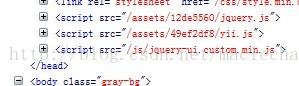
//以上定义两种有点区别,见下图加载在body区
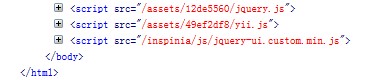
加载在head中
声明:该文观点仅代表作者本人,牛骨文系教育信息发布平台,牛骨文仅提供信息存储空间服务。
