
PHP连接数据库(注册页面的增删改查)
1.连接数据库
—————————–connect.php——————————————–
<?php
    //本地测试
    $host = "127.0.0.1";
    $port = 3306;
    $user = "root";
    $pwd = "";
    $link = @mysql_connect("{$host}:{$port}",$user,$pwd,true);
    if(!$link) {
        die("Connect Server Failed: " . mysql_error());
    }
    //选择连接的数据库库名
    mysql_select_db("my");
    //设置字符编码utf8
    mysql_set_charset("utf8");
?>
2.注册页面(html页面)
———————————-reg_9.php—————————————
<!DOCTYPE html PUBLIC "-//W3C//DTD XHTML 1.0 Transitional//EN" "http://www.w3.org/TR/xhtml1/DTD/xhtml1-transitional.dtd">
<html xmlns="http://www.w3.org/1999/xhtml" xml:lang="en">
<head>
    <meta http-equiv="Content-Type" content="text/html;charset=UTF-8" />
    <title>Document</title>
</head>
<body>
<h3>注册页面</h3>
    <form action="add.php" method="post">
        <table border="1" cellpadding="0" cellspacing="0" width="80%" bgcolor="#ABCDEF">
            <tr>
                <td align="right">用户名</td>
                <td><input type="text" name="username" id=""/>以小写字母开始,长度要求5~10</td>
            </tr>
            <tr>
                <td align="right">密码</td>
                <td><input type="password" name="password" id=""/>密码不能为空</td>
            </tr>
            <tr>
                <td align="right">邮箱</td>
                <td><input type="text" name="email" id="" /></td>
            </tr>
            <tr>
                <td align="right">性别</td>
                <td>
                    <input type="radio" name="sex" id="" value="1" />男
                    <input type="radio" name="sex" id="" value="2" />女
                    <input type="radio" name="sex" id="" value="3" />保密
                </td>
            </tr>
            <tr>
                <td align="right">个人简介</td>
                <td>
                    <textarea name="txt" id="" cols="50" rows="10"></textarea>
                </td>
            </tr>
            <tr>
                <td colspan="2"><input type="submit" name="act" value="注册" /></td>
            </tr>
        </table>
    </form>

</body>
</html>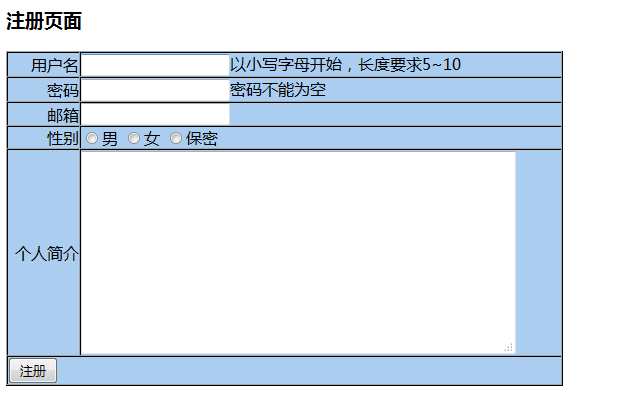
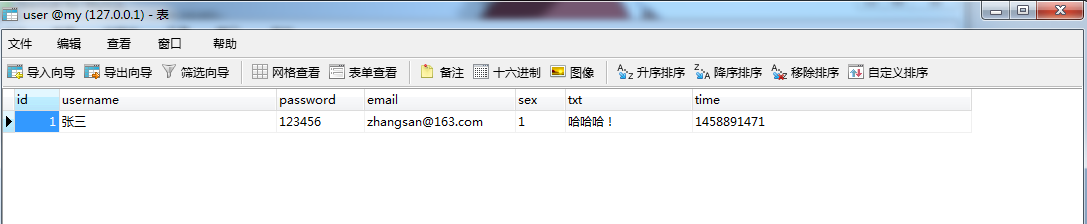
3.将注册数据显示在数据库
—————————————-add.php—————————————–
//往数据库中添加数据
<?php
header("Content-type:text/html; charset=utf-8");
//-----------------------连接数据库---------------------------
include_once "connect.php";
//-------------------------将数据连接到数据库------------------
$time=time();
$sql="insert into user (username,password,email,sex,txt,`time`) value("{$_POST["username"]}","{$_POST["password"]}","{$_POST["email"]}","{$_POST["sex"]}","{$_POST["txt"]}","{$time}")";
$res=mysql_query($sql);
header("location:hello.php");
?>
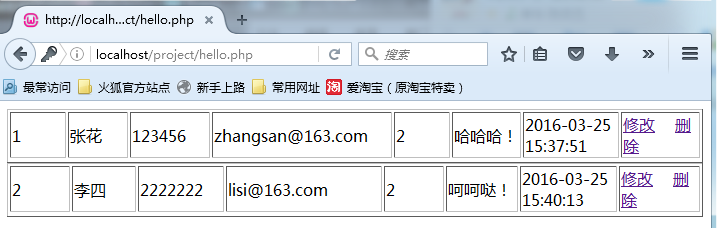
4.返回后台界面
———————————-hello.php———————————————
<?php
header("Content-type:text/html; charset=utf-8");
//-----------------------连接数据库------------------------------
include_once "connect.php";
//--------------------查询数据库--------------------------------
$query="select * from user";
$result=mysql_query($query);
if(!$result)
{
die("could not to the database<br/>".mysql_error());
}
//-------------------封装函数-----------------------------
//该函数将数据库的数据写成数组形式
function result2Arr($result){
while($result_row=mysql_fetch_assoc($result)){
$arr[] = $result_row;
}
return $arr;
}
$arr = result2Arr($result);
foreach($arr as $key=>$value){
echo "<table border="1px">";
echo "<table border="1px" >";
echo "<tr> ";
echo "<td width="100px">".$value["id"]."</td>";
echo "<td width="100px">".$value["username"]."</td>";
echo "<td width="100px">".$value["password"]."</td>";
echo "<td width="200px">".$value["email"]."</td>";
echo "<td width="100px">".$value["sex"]."</td>";
echo "<td width="100px">".$value["txt"]."</td>";
echo "<td width="100px">".date("Y-m-d H:i:s",$value["time"])."</td>";
echo "<td width="100px"><a href="update1.php?id=$value[id]">修改</a> <a href="delete.php?id=$value[id]">删除</a></td>";
echo "<tr/>";
echo "</table>";
}
?>
4.修改数据
—————————————–update1.php———————————–
//当用户要修改信息时,返回页面,页面中包含之前填写的信息
<!DOCTYPE html PUBLIC "-//W3C//DTD XHTML 1.0 Transitional//EN" "http://www.w3.org/TR/xhtml1/DTD/xhtml1-transitional.dtd">
<html xmlns="http://www.w3.org/1999/xhtml" xml:lang="en">
<head>
    <meta http-equiv="Content-Type" content="text/html;charset=UTF-8" />
    <title>Document</title>
</head>
<body>
<div>

<?php
    include_once "connect.php";
    $sql="select * from user where id="".$_GET["id"].""";
    //echo "sql:".$sql;(显示出修改哪一行)
    $result=mysql_query($sql,$link);
    $arr = result2Arr($result);
    //print_r($arr);
    $row = $arr[0];

function result2Arr($result){
    while($result_row=mysql_fetch_assoc($result)){
        $arr[] = $result_row;
    }
    return $arr;
}
?>
        <h3>注册页面</h3>
        <form action="update.php" method="post">
            <input type="hidden" name="id" id="" value="<?php echo $row["id"]?>"/>
            <table border="1" cellpadding="0" cellspacing="0" width="80%" bgcolor="#ABCDEF">
                <tr>
                    <td align="right">用户名</td>
                    <td><input type="text" name="username" id="" value="<?php echo $row["username"]?>"/>以小写字母开始,长度要求5~10</td>
                </tr>
                <tr>
                    <td align="right">密码</td>
                    <td><input type="password" name="password" id=""value="<?php echo $row["password"]?>"/>密码不能为空</td>
                </tr>
                <tr>
                    <td align="right">邮箱</td>
                    <td><input type="text" name="email" id="" value="<?php echo $row["email"]?>"/></td>
                </tr>
                <tr>
                    <td align="right">性别</td>
                    <td>
                        <input type="radio" name="sex" id="" value="1" <?php if($row["sex"]=="1"){ echo "checked";}?>/>男
                        <input type="radio" name="sex" id="" value="2" <?php if($row["sex"]=="2"){ echo "checked";}?>/>女
                        <input type="radio" name="sex" id="" value="3" <?php if($row["sex"]=="3"){ echo "checked";}?>/>保密
                    </td>
                </tr>
                <tr>
                    <td align="right">个人简介</td>
                    <td>
                        <textarea name="txt" id="" cols="50" rows="10"><?php echo $row["txt"]?></textarea>
                    </td>
                </tr>
                <tr>
                    <td colspan="2"><input type="submit" name="act" value="修改" /></td>
                </tr>
            </table>
        </form>
</div>
</body>
</html>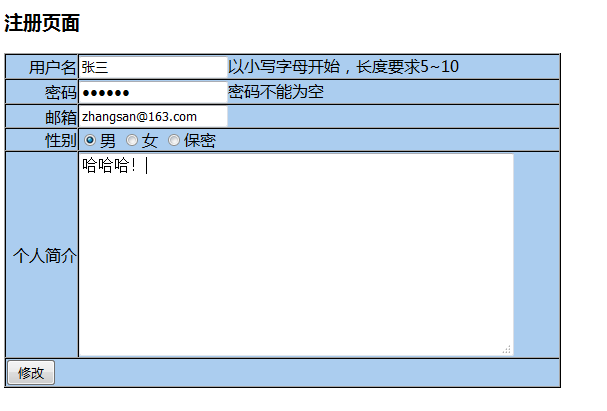
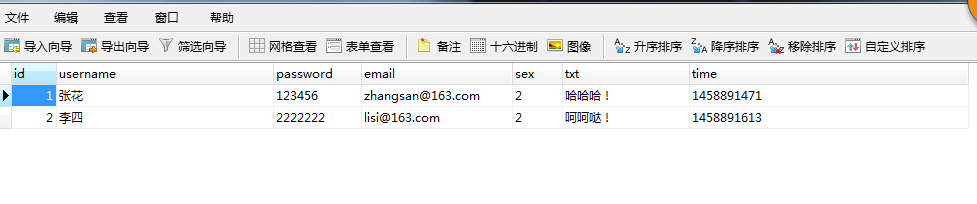
————————————–update.php————————————–
//将修改的信息存入数据库
<?php
header("Content-type:text/html; charset=utf-8");
//通过post获取页面提交数据信息
$data = $_POST;
//print_r($data);
include_once "connect.php";
$sql = "update `user` set username="{$data["username"]}",password="{$data["password"]}", email="{$data["email"]}",sex="{$data["sex"]}",txt="{$data["txt"]}" where id="{$data["id"]}"";
echo $sql;
$res = mysql_query($sql,$link);
if($res){
    header("Location:hello.php");
    //echo "alert("修改成功")";
}else{
    header("Location:update1.php?id=".$data["id"]);
    //echo "alert("修改失败")";
}
?>
5.删除数据
—————————–delete.php———————————————
//删除数据库里的数据
<?php
header("Content-type:text/html; charset=utf-8");
include_once "connect.php";
$sql = "delete from user where id="".$_GET["id"].""";
$sus=mysql_query($sql,$link);
if($sus){
    header("location:hello.php");
}else{
    echo "alert("删除失败")";
}
?>
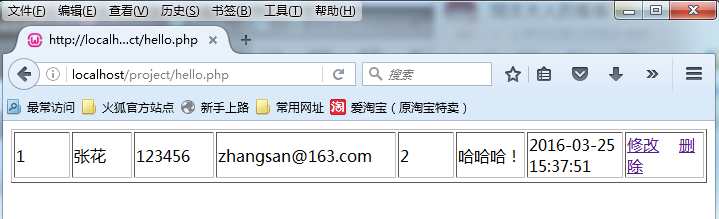
//若要删除李四,点击删除后,会自动跳转到后台页面,数据库里数据也删除

声明:该文观点仅代表作者本人,牛骨文系教育信息发布平台,牛骨文仅提供信息存储空间服务。
- 上一篇: python中文件的读写——read_csv()读取文件
- 下一篇: jstl 获取list大小
