
Yii2实现让关联字段支持搜索功能的方法
直接上代码
感谢 老胡哥,分享代码,记录一下,方便学习,且分享给大家
https://github.com/hubeiwei/hello-yii2/blob/2.0/models/search/SettingSearch.php
https://github.com/hubeiwei/hello-yii2/blob/2.0/modules/backend/views/setting/index.php
user表主键id;setting表
外键updated_by
<?php
namespace appmodelssearch;
use appmodelsSetting;
use appmodelsUser;
use yiiaseModel;
use yiidataActiveDataProvider;
/**
 * SettingSearch represents the model behind the search form about `appmodelsSetting`.
 */
class SettingSearch extends Setting
{
    /**
     * @inheritdoc
     */
    public function rules()
    {
        return [
            [["id", "key", "value", "status", "description", "tag", "updated_by", "created_at", "updated_at", "username"], "safe"],
        ];
    }
    /**
     * @inheritdoc
     */
    public function attributes()
    {
        return array_merge(parent::attributes(), [
            "username",
        ]);
    }
    /**
     * @inheritdoc
     */
    public function attributeLabels()
    {
        return array_merge(parent::attributeLabels(), [
            "username" => "操作人",
        ]);
    }
    /**
     * @inheritdoc
     */
    public function scenarios()
    {
        // bypass scenarios() implementation in the parent class
        return Model::scenarios();
    }
    /**
     * Creates data provider instance with search query applied
     *
     * @param array $params
     *
     * @return ActiveDataProvider
     */
    public function search($params)
    {
        $query = self::find()
            ->from(["setting" => self::tableName()])
            ->select([
                "setting.*",
                "user.username",
            ])
            ->leftJoin(["user" => User::tableName()], "user.id = setting.updated_by");
        // add conditions that should always apply here
        $dataProvider = new ActiveDataProvider([
            "query" => $query,
        ]);
        $this->load($params);
        if (!$this->validate()) {
            // uncomment the following line if you do not want to return any records when validation fails
            // $query->where("0=1");
            return $dataProvider;
        }
        // grid filtering conditions
        $query->andFilterWhere([
            "setting.id" => $this->id,
            "setting.updated_by" => $this->updated_by,
            "user.username" => $this->getAttribute("username"),
        ]);
        $query->andFilterWhere(["like", "key", $this->key])
            ->andFilterWhere(["like", "value", $this->value])
            ->andFilterWhere(["like", "setting.status", $this->status])
            ->andFilterWhere(["like", "description", $this->description])
            ->andFilterWhere(["like", "tag", $this->tag]);
        $query->timeRangeFilter("setting.created_at", $this->created_at, false)
            ->timeRangeFilter("setting.updated_at", $this->updated_at, false);
        return $dataProvider;
    }
}
index.php
<?php
use appmodelsSetting;
use appmodulescorehelpersRenderHelper;
use appmodulescorewidgetDateRangePicker;
use yiihelpersHtml;
use kartikgridSerialColumn;
use kartikgridActionColumn;
/**
 * @var $this yiiwebView
 * @var $searchModel appmodelssearchSettingSearch
 * @var $dataProvider yiidataActiveDataProvider
 */
$this->title = "网站配置";
$this->params["breadcrumbs"][] = ["label" => $this->title, "url" => ["index"]];
$gridColumns = [
    ["class" => SerialColumn::className()],
    [
        "attribute" => "id",
        "headerOptions" => ["width" => 80],
    ],
    "key",
    "value",
    "description",
    "tag",
    [
        "attribute" => "status",
        "value" => function ($model) {
            return Setting::$status_map[$model->status];
        },
        "filter" => RenderHelper::dropDownFilter("SettingSearch[status]", $searchModel->status, Setting::$status_map),
        "headerOptions" => ["width" => 100],
    ],
    "username",
    [
        "attribute" => "created_at",
        "format" => "dateTime",
        "filterType" => DateRangePicker::className(),
        "filterWidgetOptions" => [
            "dateOnly" => false,
        ],
        "headerOptions" => ["width" => 160],
    ],
    [
        "attribute" => "updated_at",
        "format" => "dateTime",
        "filterType" => DateRangePicker::className(),
        "filterWidgetOptions" => [
            "dateOnly" => false,
        ],
        "headerOptions" => ["width" => 160],
    ],
    ["class" => ActionColumn::className()],
];
?>
<div class="setting-index">

    <h1><?= Html::encode($this->title) ?></h1>

    <hr>

    <p>
        <?= Html::a("添加配置", ["create"], ["class" => "btn btn-info"]) ?>
    </p>

    <?= RenderHelper::gridView($dataProvider, $gridColumns, $searchModel) ?>

</div>
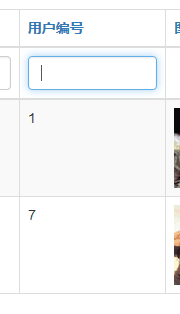
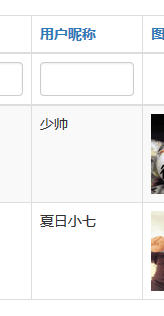
效果图
声明:该文观点仅代表作者本人,牛骨文系教育信息发布平台,牛骨文仅提供信息存储空间服务。
- 上一篇: php数字与字符串比较时的注意事项
- 下一篇: php两个数字进行比较大小
